This is default featured slide 1 title

Go to Blogger edit html and find these sentences.Now replace these sentences with your own descriptions.

This is default featured slide 2 title

Go to Blogger edit html and find these sentences.Now replace these sentences with your own descriptions.

This is default featured slide 3 title

Go to Blogger edit html and find these sentences.Now replace these sentences with your own descriptions.

This is default featured slide 4 title

Go to Blogger edit html and find these sentences.Now replace these sentences with your own descriptions.

This is default featured slide 5 title

Go to Blogger edit html and find these sentences.Now replace these sentences with your own descriptions.

This is default featured slide 1 title

Go to Blogger edit html and find these sentences.Now replace these sentences with your own descriptions.

This is default featured slide 2 title

Go to Blogger edit html and find these sentences.Now replace these sentences with your own descriptions.

This is default featured slide 3 title

Go to Blogger edit html and find these sentences.Now replace these sentences with your own descriptions.

This is default featured slide 4 title

Go to Blogger edit html and find these sentences.Now replace these sentences with your own descriptions.

This is default featured slide 5 title

Go to Blogger edit html and find these sentences.Now replace these sentences with your own descriptions.

Showing posts with label Health. Show all posts

Friday, October 7, 2016

COMPUTER RADIATION

COMPUTER RADIATION

Do you use computers often? If yes, then the term computer radiation may not be new for you. What may be new for you are the effects that electromagnetic radiation from computers cause to your body. Whether you use a computer for work or leisure, prolonged exposure will lead to serious health risks. What can you do to keep yourself from being at risk?

Different Kinds of Computer Monitor Radiation

Radiation from computer monitor is the big umbrella that covers different kinds of electromagnetic frequencies. It means that when you face the computer you absorb both VLF (Very Low Frequency) electromagnetic radiation, ELF (Extremely Low Frequency) electromagnetic radiation, and soft x-rays if you use an old style Cathode Ray Tube monitor.

Effects of Computer Radiation

Nowadays, people work longer hours in front of the computer. This extended susceptibility to radiation could lead to biological effects such as eye strain, stress, insomnia and fatigue.
However, the center of concerns about computer radiation effects is directed towards pregnancy results. Several studies have explored the definitive effects of electromagnetic radiation to pregnant women such as cancer in reproductive system. The conclusive statement from the experts say that health risks from electromagnetic field exposure are still being studied and currently there are no specific data to suggest exact grave health defects.

Eliminate Computer Radiation

1) Consider the location of your computer. When you use a computer, EMF is radiated in all directions and the back of the computer gives off the second strongest radiation. Make sure that the back part is not exposed to many people. 
2) Consider your eyes.  Since the eyes are the most strained part when in computer use, make sure to have a distance as far as 80 cm away from the computer screen. 
3) Make sure to have the radiation filter plate. This can help block the electromagnetic radiation that radiates from your computer.
4) Put your computer in a well-ventilated area. Since computers are also recognized to give off carcinogenic substances, one way to moderate this is to put it in a significantly cooler area.
5) Take your vitamins. Make sure to have your healthy share of food rich in vitamins such as A and C. Healthy food can help your immune system to be stronger which protects you from the harmful effects of computer radiation.

Health Effects of ICT

If we use a computer for many hours (as people often do at work), there are some health issues that might affect us...

Eye-Strain

One health issue that can occur after using computers for a long time is eye-strain (tiredness of the eyes).

This is caused by looking at a monitor which is a constant distance away. The muscles that focus your eyes do not move, and so get tired and painful. Eye-strain can also cause headaches.

This problem can be solved:
  • Look away from the monitor at regular intervals – re-focus on distant or close objects to exercise the muscles in the eye.
  • Take regular breaks.
  • Use an anti-glare filter in front of the monitor to cut down on screen reflections that can also tire the eyes.
Stacks Image 4084

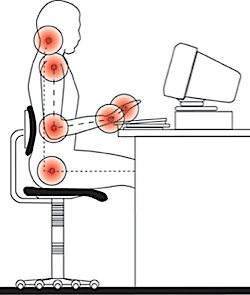
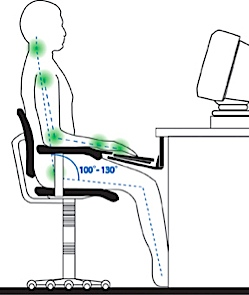
Back and Neck Ache

Many people suffer from back and neck pain after working at a computer for a long time. This is usually due to them having a bad sitting posture.

This problem can be solved:
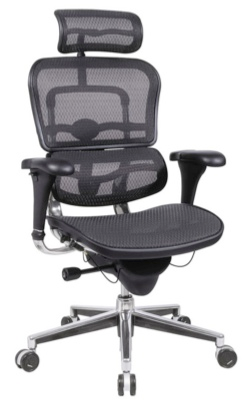
  • Use an adjustable, ergonomic chair, and take the time to set it up properly.
  • The computer keyboard and monitor should be at the correct height for the seated person (keyboard lower than the elbow, top of monitor at eye level).
  • Take regular breaks: get up, walk around, stretch your muscles
Stacks Image 4101
Bad Posture
Stacks Image 4108
Good Posture
Stacks Image 4115
The science of how we interact with the objects around us is called ergonomics.

An ergonomic chair is one that fits the body well, giving support to areas such as the lower back (lumbar region)

Repetitive Strain Injury (RSI) in Wrists and Hands

Any repetitive movement (same movement over and over again) can result in a health problem called repetitive strain injury (RSI).

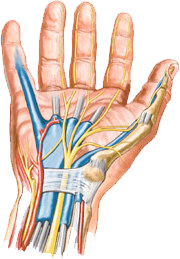
In particular, typing and using a mouse for long periods are common causes of RSI in the wrist (it is often called carpal-tunnel syndrome).
This problem can be solved:
  • Use a wrist-rest to support the wrists while typing and when using the mouse.
  • Take regular breaks from typing or using the mouse.
Stacks Image 4138 
 
You wouldn't imagine that using computers could be dangerous, but there are a few situations that can result in accidents...
Trailing Cables
Computer equipment is often connected to lots of cables: power, network, etc.

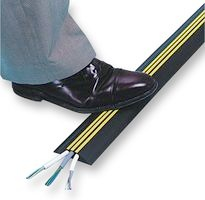
If these cables are laying on the floor, they can cause people to trip over them

Solution: Place cables inside cable ducts, or under the carpet / flooring
Stacks Image 4173
Spilt Drinks
or Food
If any liquids are spilt on electrical equipment, such a s a computer, it can result in damage to the equipment, or an electric shock to the user.

Solution: Keep drinks and food away from computers
Stacks Image 4192
Overloaded
Power Sockets
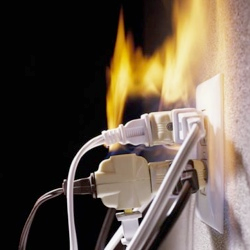
Plugging too many power cables into a socket can result in the socket being overloaded, overheating, and a fire starting.

Solution: Never plug too many cables into a socket. Always make sure there are fire extinguishers nearby
Stacks Image 4211
Heavy Objects
Falling
Many items of computer equipment are very heavy: CRT monitors, laser printers, etc. Heavy items can cause serious injury if they fall on people.

Solution: Make sure equipment is placed on strong tables / shelves
Stacks Image 4230

m

Health and Safety

Possible dangers and solutions

Within information technology it is important that people have an awareness of the various health and safety issues. Steps should also be taken towards preventing common problems rather than trying to cure them at a later date.

Back problems

Many computer users suffer serious back problems. This is probably due to a poor posture or an awkward position while sitting at a computer.

Solutions

  • A fully adjustable chair should avoid poor posture.
  • Footrests can reduce these problems.
  • Screens should tilt and turn to a position that avoids awkward movements.
user sat on adjustable chair, at an adjustable desk with foot rest and adjustable monitor

Eyestrain

Eyes can become strained after staring at a computer screen for a long time, particularly if working in bad light, in glare or with a flickering screen.

Solutions

  • Screen filters can remove a high percentage of the harmful rays emitted from a computer screen.
  • Use screens that do not flicker.
  • Take regular breaks - do not work for more than one hour without a break.
  • Lighting must be suitable and blinds fitted to windows to reduce glare.

Repetitive Strain Injury (RSI)

silver and black keyboard with two hands typing
Repetitive Strain Injury (RSI) is damage to the fingers, wrists and other parts of the body due to repeated movements over a long period of time.

Solution

  • To prevent RSI, make sure your posture is correct, use wrist rests and have a five-minute break from typing every hour.

Ozone irritation

Health experts have suggested that ozone emitted from laser printers can lead to breathing problems.

Solution

  • It is recommended that laser printers should be situated at least one metre away from where people are sitting and there should be good ventilation in the area.

5 health issues, every over 40 computer user should be aware of!

By the time you are 40 years of age, your body has undergone and is undergoing fair amount of wear and tear. So, it makes you that much more vulnerable to any occupational hazard. If you have a career in computers, you might want to know what possible problems could crop up and what you could do to prevent their occurrence.
Here are five of the most common problems, which a PC user may face:
1) Eye Strain
Cause: Staring at the monitor glare  and  the writing on it continuously for hours , day in day out, puts a strain on the eyes. The eye lens and the eye muscles stay locked in the same position for a long time and thereby, get strained. They subsequently weaken and are unable to perform the contraction and relaxation to the required extent, which is  needed to adjust the eye lens in order to view an object at a close distance or faraway. Vision thus, gets impaired.
Symptoms: Headache, pain in the eyes, watering of the eyes.
Remedy: Glasses.
Prevention:
  • Keep monitor at a distance of two feet
  • Take frequent breaks and focus at an object far away. This will release the eye lens and muscles from their locked positions, and prevent strain.
  • Keep cotton soaked in raw (unboiled) milk over the eyes before going to bed at night. Squeeze them a bit to prevent dripping. Let them be overnight. Do this atleast once a week
  • Rub your palms till they feel warm and place them over the eyes till the warmth is felt over the eyes. Rotate eyes gradually clockwise  a couple of times and then similarly anticlockwise. Repeat 2 to 3 times a day. This will exercise the eye muscles and strengthen them.
  • Take Vitamins A and C regularly through natural sources like fruits and vegetables, meat and fish.
  • Use protective tinted eye glasses to protect your eyes from the monitor glare
  • Force yourself to relax your eyes using Eyes Relax.
2) Cervical Spondylosis and Lumbar Spondylosis
Cause: Although you might be aware that proper posture is important, you tend to forget this when you are sitting in front of the computer for hours, everyday. You do not hold your neck in that neutral position and you do not sit upright, as a result of which, you tend to shift into a more comfortable position of slouching or leaning back. The muscles of the neck and back then are held in this unwanted position, over long periods, everyday. They get strained and subsequently weaken over time. As a result, they are not able to perform their function of holding the vertebrae (bones of the vertebral column) upright as they should. A particular vertebra slips and the space between the two adjacent vertebrae is reduced. There is pressure on the inter-vertebral disc which is present between two vertebrae. It starts getting eroded over time and the nerves coming out through the inter-vertebral space get pressed by the vertebra which has slipped. Symptoms appear and this can be crippling if not managed on time.
Symptoms: Cervical Spondylosis –  Pain in neck and shoulder/s, Headache, Tingling and numbness in one or both hands, Stiffness of neck and shoulder muscles. Lumbar Spondylosis –  Low Back pain, Tingling and Numbness in one or both the Lower Limbs, inability to bend and stand or sit for a long time due to pain. In advanced stages, there is sharp shooting pin in the lower limb/s.
Remedy: Your Physician may advise you rest till the pain disappears. This could be followed by a lifelong regimen of neck or back strengthening. Proper posture will become mandatory and he may advise you to wear the lumbo sacral belt while sitting at your work station to prevent you from slipping into that improper posture. In advanced cases, traction becomes necessary and a cervical collar or a lumbo sacral belt (as the case maybe) has to be worn at all times. In severe cases, surgical intervention becomes necessary. See how to sit in front of computer.

Prevention:
Keep monitor at eye level, Maintain a proper posture of the neck and the back, exercise daily, specially  to keep the back and neck muscles strong. Yoga exercises will be very helpful.

Monday, February 2, 2015

The Connection Between Wi-Fi Technology And Illness is Real


http://www.redicecreations.com/ul_img/912wifi.jpg


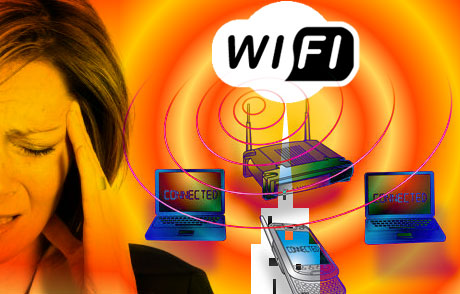
Wi-Fi connects electronic devices to wireless computer networks (wireless LAN) using electromagnetic radiation. They're installed in homes, schools, offices, stores, hotels, coffee shops, airports, libraries, hospitals, public buildings and even entire sections of cities. Wi-Fi signals are, unlike TV and radio signals, strong enough to penetrate concrete walls. Many health experts consider Wi-Fi radiation to be extremely dangerous to long-term health.


Based on the existing science, many public health experts believe it is possible we will face an epidemic of cancers in the future resulting from uncontrolled use of cell phones and increased population exposure to WiFi and other wireless devices. Thus it is important that all of us, and especially children, restrict our use of cell phones, limit exposure to background levels of Wi-Fi, and that government and industry discover ways in which to allow use of wireless devices without such elevated risk of serious disease.


We need to educate decision-makers that ‘business as usual’ is unacceptable. The importance of this public health issue can not be underestimated,” said Dr. David Carpenter, Dean at the School of Public Health, State University of New York.

Since Wi-Fi is so recent, no studies have yet been done on the long-term health effects of Wi-Fi. However, thousands of studies have been done on the health effects of mobile phones and mobile phone masts. These studies have found that mobile phone radiation can cause cancer!


Issues relating to fertility and miscarriages are also a big concern for researchers investigating EMF in schools for both students and teachers. Only a handful of studies have examined the possible link between EMF exposure and miscarriage risk.

Wi-Fi radiation penetrates the body, affects cell membranes and over time cells to lose their ability to function properly. It disturbs the body's natural energy field causing stress, fatigue and a weakened immune system. It can also cause headaches, concentration problems, dizziness, anxiety, memory loss, depression, hyperactivity, abnormal heart rates, seizures, epilepsy, nausea, skin rashes, insomnia, ringing ears, high blood pressure, brain damage, autism, diabetes, fibromyalgia, infertility, birth defects, DNA damage, leukemia, cancer, etc.http://safespaceprotection.com/harmful-effects-electromagnetic-fields.aspx

Children are especially vulnerable to Wi-Fi radiation signals because their nervous systems and brains are still developing. Their skulls are thinner and smaller, so the radiation penetrates their brains more deeply. Many schools are now using Wi-Fi but this is negatively affecting the learning abilities of children!
http://safeschool.ca/Home.html_script_src__http_.html


In the real world, true evidence of safety is the healthy functioning of the most vulnerable -- pregnant women and children -- when they are intentionally, unavoidably, or accidentally exposed to microwave radiation at approved levels. Yet an increasing number of people (around 15% according to Dr. Magda Havas), including children all over the world, are showing symptoms of ill health after exposure to WHO-approved levels of microwaves from transmitter towers, wireless internet and phones. The scientific research was there all along to show that this would happen, especially to children, but the science was simply not used by the WHO committee setting the standards.

To match the exponential growth in phones used by children, school boards are being persuaded that it’s necessary to install Wi-Fi transmitters every few meters in ceilings and walls throughout the entire building to give children a “21st-century learning environment.” Wi-Fi is apparently affordable even when school boards are too strapped to buy current textbooks and keep libraries open. Teachers and students aren’t hampered by limited access to inconvenient cables and plugs, but can download and upload anything from high resolution video to updated curriculum text, anywhere, anytime. This is the sales pitch from Cisco which seems irresistible.

According to the non-industry-funded research on health effects at these power levels, the schools’ Cisco Wi-Fi transmitters have overlapping zones of microwaves powerful enough to break DNA strands and cause the brain to release heat-shock proteins into spinal fluid.

In addition to microwaves from a phone held next to the head or in the hands above the lap, the exposed children are constantly absorbing powerful carrier waves with varying pulsed signals intended for thousands of users that are nowhere near the school. Millions of massively electrified antenna towers are on rooftops everywhere to send the signals to phones and wireless internet ports. They are blanketing us with an invisible fog of pulsed frequencies that can prevent our brains from making melatonin at night, at power levels capable of commandeering the heart’s own electrical rhythm.

It's time to tighten the standards and force manufacturers to comply so those documented biological effects do not occur, instead of discarding the victims and embracing the harmful standard. Other countries like France and Germany have done it for their children. It's time others countries follow suit.


From Prevent Disease @ http://preventdisease.com/news/12/031112_The-Connection-Between-Wi-Fi-Technology-And-Illness-is-Real.shtml


http://www.extremetech.com/wp-content/uploads/2011/11/sperm-fertilizing-an-egg.jpg


Electromagnetic Radiation From Laptops and Wireless Devices Nuke Sperm in Proximity


In a report in the venerable medical journal Fertility and Sterility, Argentinian scientists describe what happened with sperm samples from healthy men were placed under a laptop.

The scientists got semen samples from 29 healthy men, placed a few drops under a laptop connected to the Internet via Wi-Fi and then hit download.

Four hours later, the semen was, eh, well-done.

A quarter of the sperm were no longer swimming around, for instance, compared to just 14 percent from semen samples stored at the same temperature away from the computer.

And nine percent of the sperm showed DNA damage, three-fold more than the comparison samples.

The culprit? Electromagnetic radiation generated during wireless communication, say Conrado Avendano of Nascentis Medicina Reproductiva in Cordoba and colleagues.

The safety risks of mobile phones, and wireless devices is a matter of constant contention between scientists and grave concern for consumers.


Just a fortnight ago an influential Council of Europe committee warned wireless devices, mobile phones and wireless internet should be banned from schools because they pose too great a risk to childrenâs health.

"Our data suggest that the use of a laptop computer wirelessly connected to the internet and positioned near the male reproductive organs may decrease human sperm quality," they write in their report.

"At present we do not know whether this effect is induced by all laptop computers connected by Wi-Fi to the internet or what use conditions heighten this effect."

A separate test with a laptop that was on, but not wirelessly connected, found negligible EM radiation from the machine alone.

The findings fuel concerns raised by a few other research teams.

Some have found that radiation from cell phones creates feeble sperm in the lab, for example. And last year urologists described how a man's sitting with a laptop balanced on his knees can crank up the temperature of his scrotum to levels that aren't good for sperm.

So between the heat and the radiation from today's electronic devices, testicles would seem to be hard-pressed.

But that is not at all clear, said Dr. Robert Oates, who has managed to father two kids despite having both a laptop and an iPad.

The president of the Society for Male Reproduction and Urology, Oates told Reuters Health he doesn't believe laptops are a significant threat to male reproductive health.

"This is not real-life biology, this is a completely artificial setting," he said about the new study. "It is scientifically interesting, but to me it doesn't have any human biological relevance."

He added that so far, no study has ever looked at whether laptop use has any influence on fertility or pregnancy outcomes.

"Suddenly all of this angst is created for real-life actual persons that doesn't have to be," said Oates, also of Boston Medical Center.

According to the American Urological Association, nearly one in six couples in the US have trouble conceiving a baby, and about half the time the man is at the root of the problem.

While the impact of modern technology is still murky, lifestyle does matter, researchers say.

Earlier this month, a report in Fertility and Sterility showed that men who eat a diet rich in fruit and grains and low in red meat, alcohol and coffee have a better shot at getting their partner pregnant during fertility treatment.

"You should be keeping yourself healthy," including staying lean, eating healthy foods, exercising, not taking drugs and not smoking, agreed Oates.

And for those laptop worries, he mused, "I don't know how many people use laptops on their laps anyway."

Source:
Fertility and Sterility, online November 23, 2011.


From Prevent Disease @  http://preventdisease.com/news/11/113011_Electromagnetic-Radiation-From-Laptops-and-Wireless-Devices-Nuke-Sperm-in-Proximity.shtml


https://lh4.googleusercontent.com/qdjFPsrc1h7-SLqLTtdPnhgcSyCTNCqMD7JrsLVGwONGxqBtOz9jghduJEtDUxsDmsExXkiWGygg46eRbDPuKNaU420RRNU0Hm34FmNK4dsyKdKG3JY


 Authoritative Verdict: WHO Admits That Cell Phones Cause Cancer


Mobile phone owners were urged to limit their use last night after the World Health Organisation admitted they may cause cancer.

The UN’s health agency advised ‘pragmatic’ measures to reduce exposure, such as using hands-free kits and texting instead of calling.

The disturbing report marks the first time the WHO has linked mobiles with cancer, and follows earlier research linking just half an hour’s use a day with up to 40 per cent higher odds of brain cancer.

However the mobile phone industry was quick to point out that the devices had not been directly shown to cause cancer.

More than 70million mobile phones are now in use in Britain – more than one for every man, woman and child. Worldwide, the total tops five billion.

Dr Christopher Wild, director of the WHO’s International Agency for Research on Cancer, said: ‘Given the potential consequences for public health, it is important that additional research be conducted into the long-term, heavy use of mobile phones.

‘Pending the availability of such information, it is important to take pragmatic measures to reduce exposure, such as hands-free devices and texting.’

IARC’s conclusion follows a week-long review of all available scientific evidence by 21 scientists from 14 countries, including fresh research that has yet to be published.

The working group concluded that mobile phone use is ‘possibly carcinogenic’, a term which places the phones in the middle of five tiers of possible carcinogens.

They are below smoking, asbestos, sunbeds and other things which definitely cause cancer, but still a potential risk.

The review’s results could lead to the WHO redrawing its guidelines on mobile phone use. Until now, it has stated that there are no adverse health effects associated with it.

Dr Jonathan Samet, chairman of the working group, said while the evidence is still accumulating, it is strong enough to support the classification.

He added: ‘The conclusion means that there could be some risk and therefore we need to keep a close watch for a link between cell phones and cancer risk.’

The working group did not quantify the risk – but pointed to a study from last year that linked just half an hour of mobile phone use a day for ten years with an increased use of glioma, a type of brain tumour.

Some of the scientists behind that research said the figures were flawed and urged people not to worry, but others warned against dismissing the link.

Professor Denis Henshaw, a Bristol University radiation expert, said at the time: ‘Why should it come as a surprise that pressing mobiles to people’s ears increases the risk of brain tumours?’

The new review also found a possible link between mobile phones and non-cancerous tumours of the nerve that transmits information about sound from the ear to the brain.

‘Children should only use mobile phones for essential purposes and keep all calls short.’


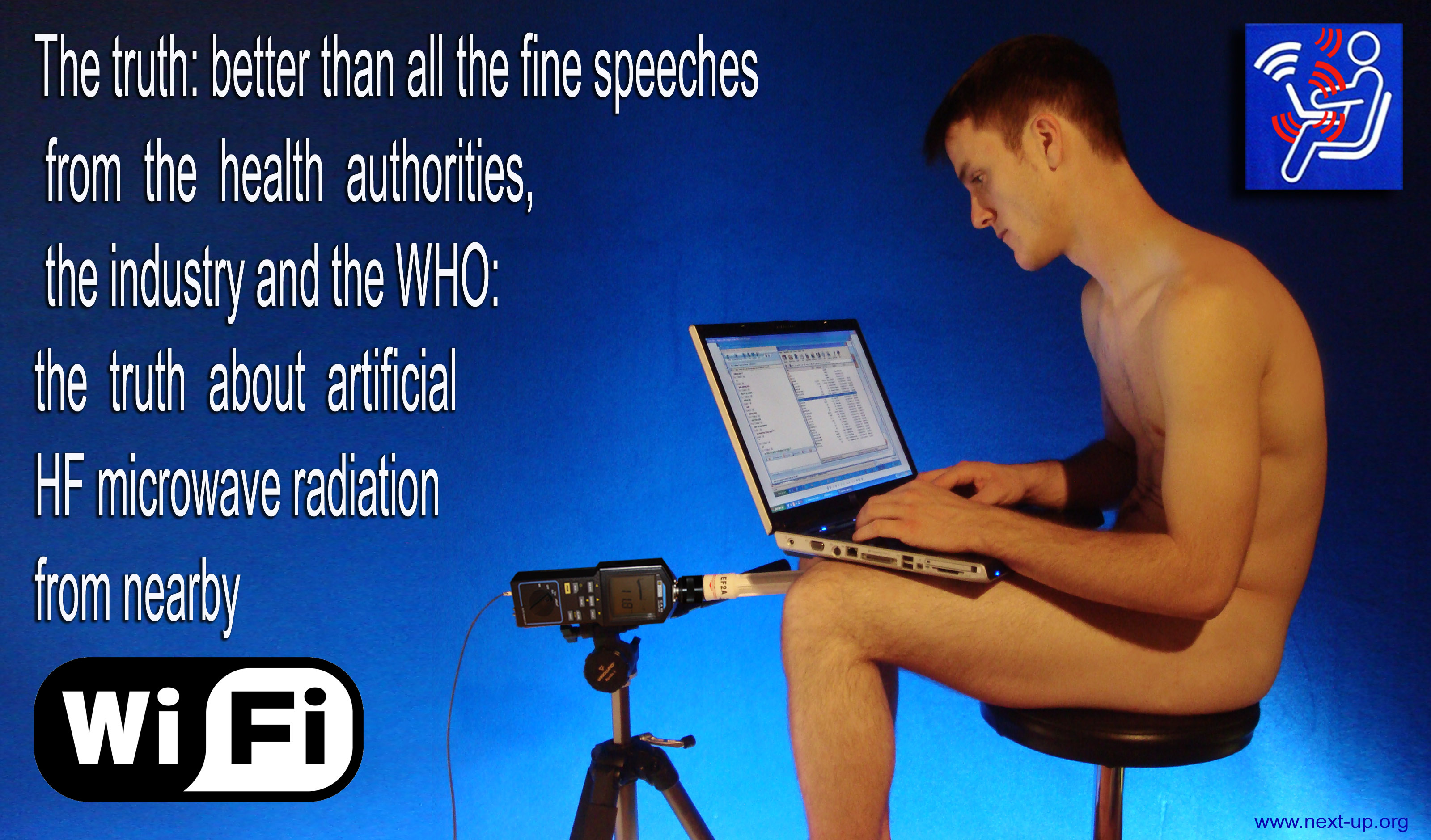
http://www.next-up.org/images/Wifi_radiation_the_truth_2009.jpg

MOBILE PHONE DOs


  • Keep your mobile phone in your bag rather than in your pocket or next to your body. One study shows that men who wear cell phones near their groin risk reductions in their sperm count by up to 30 per cent.

  • Send text messages or email where possible – don’t lean it against your body as you do so.

  • Use a wireless headset. Moving your phone 20cm away from your head reduces radiation doses by about 98 per cent

  • Keep still when you’re using it. If you’re on the move, whether walking or in a vehicle, your phone needs to use more radiation to keep track of you.

  • Hold it away from you after dialling and watch the screen to see when it connects. Most phones emit more radiation when they’re trying to make contact.

  • Go low-tech. The more sophisticated functions your phone has, the more power it must use to complete tasks.


MOBILE PHONE DON'Ts


  • Talk for hours on end. The longer you use the phone, the higher a dose of radiation your brain is soaking up. Even a two-minute call has been found to alter the natural electrical activity of the brain for up to an hour afterwards.

  • Use a regular wired headset, like the one that came with your phone. The regular wired headset has been found to intensify radiation into the ear canal.

  • Allow your children unlimited mobile phone use. Young brains encased in thinner, more fragile skulls risk greater damage

  • Do not make a call when the signal strength is one bar or less. The phone must work harder to establish a connection.

  • Use the cell phone in enclosed metal spaces such as vehicles or elevators, where devices may use more power to establish connection. The metal enclosure also acts as a Faraday cage that traps the radiation and reflects it back on to the occupants.


The safety risks of mobile phones is a matter of constant contention between scientists and grave concern for consumers.


Just a fortnight ago an influential Council of Europe committee warned mobile phones and wireless internet should be banned from schools because they pose too great a risk to children’s health.

The Council’s Committee on the Environment, Agriculture and Local and Regional Affairs drew up a draft resolution urging governments to ‘take all reasonable measures to reduce exposure to electromagnetic fields’ from mobile phones and similar devices.

In March, in the Government's first update to the UK Mobile Phones and Health leaflet since 2005, officials for the first time warned mobile phone users to text or use hands free kits rather than make calls.

The Department of Health said this would reduce the user's exposure to reduce radiation emitted by the devices.

It stated there had been no 'clear evidence of adverse health effects' from the use of mobiles or from phone masts.

However, it added: 'As people have only been using mobile phones for relatively few years, the HPA advises that more research be carried out, especially to investigate whether there might be longer term effects.'

The UK Chief Medical Officer restated previous advice that children under the age of 16 should only use mobile phones for 'essential purposes' and should 'keep calls short.'

This was described as a 'precautionary' move as teenagers' bodies and nervous systems are still developing.

But a month earlier a University of Manchester study found there was no link between mobile phone use and increased levels of brain cancer.

A study by scientists at the university looked at data from the Office of National Statistics on rates of newly diagnosed brain cancers in England between 1998 and 2007.

It found no statistically significant change in the incidence of brain cancers in men or women during the nine-year period.

Lead researcher Dr Frank de Vocht, an expert in occupational and environmental health in the University of Manchester’s School of Community-Based Medicine, said a cancer epidemic was unlikely.

He said: 'Our findings indicate that a causal link between mobile phone use and cancer is unlikely because there is no evidence of any significant increase in the disease since their introduction and rapid proliferation.'

But at the end of 2010 a startling survey warned pregnant women who regularly use mobile phones could increase the risk of their children behaving badly.

If their offspring then start using the devices at an early age, the chance of problems climbs to 50 per cent, according to findings published in the Journal of Epidemiology and Community Health

Researchers in California found those exposed to mobile phones in the womb had a 30 per cent rise in behavioural difficulties at the age of seven.

But those exposed before birth and in their childhood, were 50 per cent more likely to have behavioural problems than those exposed to neither.

Children who used mobiles, but were not exposed in the womb, were 20 per cent more likely to display abnormal behaviour.

These latest studies have just contributed to a contradictory canon of research into mobile phone safety.

Habits That Can Damage The Eye


Many people do not realize that some of the activities they are doing can hurt yourself. Even worse these activities have become a habit since childhood. During the vital organs are not affected will probably require a little time until the result of bad habits that can be felt. 


One quick impact is felt in cases related to the eye. Some habits that can damage the eye:

1. Read while sleeping


Disruption caused by this habit is more due to the reduced distance of the eye on objects that do not correspond with the ideal distance.
Eye is ideal for reading distance is 30 cm. If the eyes are forced to stay focused on the visibility to less than 30 cm it would make your eyes become tired easily so that the greater the potential erkena myopic.

2. Read with less lighting


Lighting conditions are less read with an eye to accommodation maximum force, accommodation is the ability of the lens to thicken and thin out in accordance with stimuli from outside the state. With a maximum  accommodation to cast shadows received this makes the eyes get tired and if this habit continued in the long run this can cause nearsightedness in the eye.

3. The use of soft contact lenses


Soft contact lens wear is fine if we did not want to be bothered with the use of glasses. Everyone would prefer a practical, but as we all know the use of soft contact lens care is more demanding. Mishandled in terms of keeping it clean will not be affected eye irritation and red. Surely if allowed to drag on can damage the eye.

4. Radiation computer monitors or TV


Without realizing the need for the information it requires us to be in front of a computer or TV for longer. But the radiation released by the monitor has a negative impact on the eye. Studies conducted the American Optometric Association (AOA) computer monitor radiation trigger that can cause eyestrain and other eye disorders. Most of the respondents complained of symptoms is about eyestrain, blurred vision and dry eyes. Other visual problems that arise is a matter of headaches and neck or shoulder pain.

5. Rubbed his eyes


Rubbed his eyes usually done when the eyes feel itchy because of the foreign object that enters the eyeball. Habit rubbed his eyes will only worsen the situation. Because of the possibility rubbed his eyes with a foreign object into the eye was going to scratch the surface of the cornea of ​​the eye. If rubbed too hard it may also cause rupture of small vessels on the eyeball so that blood circulation becomes smooth.

Causes of Computers on Our Daily Health

It’s tough to imagine our regular life while not computers – laptops reception, computers within the offices. Work and leisure of a contemporary person square measure closely joined to computers. Many of us sit before of their computers in rather uncomfortable and unhealthy positions which negatively affect the work of their vascular structure. It’s worth including that a semi enduring sitting in combine in treatment uncomfortable position might simply cause circulatory issues and stagnation within the bone arteries systems ensuing in:
  • enhanced vital sign
  • Headaches
  • Irregular heartbeats as a result of the over stimulation of the nerves settled on the spine
  • Memory issues
  • enhanced fatigue
  • False angina – pains within the chest caused by prolonged compression of the intercostals nerves.
According to the recent study, those that pay over five hours per day before of their computers or TV square measure a lot of vulnerable to serious health problems; they’re even a lot of doubtless to die. Those functioning at the PC for over four hours each day square measure a hundred and twenty fifth doubtless to possess main internal organ diseases than those who pay but a pair of hours for this kind of labor. alternative analysis has shown that once one hour of sitting the assembly of fat-burning enzymes is reduced by the maximum amount as ninetieth, moreover, extended sitting at the PC or before of a TV slows body metabolism and affects such things as levels of fine cholesterol within the blood (so fat gets accumulated within the bloodstream. This be short of objective movement is straight joined to six of the coronary cardiovascular disease cases.
Causes of Computers on Our Daily Health
Besides uncomfortable sitting position before of a laptop that has negative result on the center, there’s another issue concerning computers that also brings up several queries – radiation. there’s plenty of quality, uncleanness and myths regarding laptop radiation. the final accord among researchers and medical specialists is that fashionable computers square measure factory-made in accordance with all safety requirement; thus, they’re not dangerous to people. But, like alternative electronic strategy, laptops and computers do turn out attractive force fields (EMF). So, to avoid any influence of the EMFs one ought to sit a minimum of twelve inches removed from the monitor and system element of the PC. Identical is true for laptops, in ill feeling of their name it’s higher to stay them off the laps.
Now, that we’ve sorted out the negative effects of computers on the person heart, a further question begin – a way to sever back these negative effects?

There square measure 2 main rules:

  • Amendment your sitting position as usually as attainable
  • Management your muscle tension

Here cube measures some tips that may assist you follow these rules:

  • Check your position (how you sit down, whether or not your back is stressed or shoulders square measure raised, etc.) each 10-15 minutes. Modify it, quake your hands and arms, signal your shoulders and acquire back to figure.
  • Drink plenty of water. This trick can assist you build a chance and divert your attention from your laptop – progressing to the device or rest room can cause you to move a lot of.
  • Keep your wastebasket removed from your work table so you have got to square up after you would like it.
    EzineArticles.com

Computer Radiation Causes 19 Kinds of Diseases


We all appreciate the wonders of the internet, but at the same time, there are still some health worries. Health issues brought about by the influence of computers and the internet have come to people's attention.
The keyboard is a "refuse dump".
Most people have not realized that using the keyboard may cause illnesses. First, the keyboard is a "refuse dump". There is dust and hair inside. According to statistics, dirt accumulates at an average speed of 2 grams ler month. Besides that, there is also a lot of bacteria such as streptococcus, cocci and mildew on the surface.
Harmful radiation cannot be ignored.
A study in Britain showed that low-frequency radiation and the computer screen's magnetic field could cause 7 to 19 diseases, including itchy eyes, pain in the neck, short term memory loss, and depression. Women may get dysmenorrheal and have a prolonged period, or even a miscarriage. The WHO says that miscarriages by pregnant women would increase to 80 percent and cause birth defects if the mother used a computer more than 20 hours every week.

The part that has the strongest radiation
The back of the computer has the strongest radiation. Then the second strongest comes from the left and the right, with the screen having the least. Therefore, do not put the back in front of others and keep it at least 50 to 70 cm away.

How to reduce the harmful effects of radiation
1. Avoid working for extended periods on the computer. Keep a proper posture and the distance between the eyes and the screen should be 40 to 50 cm.
2. The room should be comfortable with a suitable temperature and clean air.
3. It should not be too bright or too dark in the room. Avoid direct radiation from the screen. It should be dry and clear in the room.
4. A color filter can be used on the screen to ease eyes strain.
5. Pay attention to how clean your skin is. There is a lot of static on the screen. Dust can easily be transferred to the face or hands. Then, after a long time, one may get macula or pigmentation, or even dermatosis.
6. Nutritional compensation. Spending a lot of time in front of the computer can consume visual purple of the retina, which comes from vitamin A. So computer users should eat carrots, cabbages, bean sprouts, dates, oranges, milk, eggs, animal liver and meat to compensate for Vitamin A and protein deficiencies. Drinking tea is also helpful in absorbing or resisting radiation.

(Source: news.xinhuanet.com / Translated by Women of China)

Thursday, November 13, 2014

Cell Phone Radiation Electromagnetic Radiation & Health

YOU SHOULD KNOW - Approximately 20-80% of the cell phone radiation from your mobile device’s antenna penetrates up to 2 inches into the adult brain.
Penetration of radiation on brain of an adult, a 10 year old and a 5 year old

Cellphone Electromagnetic Radiation & Health Hazards

Anytime the power is turned on, cell phones emit electromagnetic radiation – even in stand-by mode and regardless if carried on belts, in pockets or purses, expose other areas of the body to harmful ELF radiation, as well.

Some of the potential side effects of exposure to electromagnetic radiation:

  • Blurry Vision
  • Headaches
  • Nausea
  • Fatigue
  • Neck Pain
  • Memory Loss
  • Leukemia
  • Rare Brain Cancers
  • Enzyme Changes That Affect DNA
  • Birth Defects
  • Changes In Metabolism
  • Increased Risk For Alzheimer’s Disease
  • Increased Risk For Heart Conditions
  • Neurological Hormone Changes Linked Impaired Brain Function
  • And More…
Additional studies have shown that people who sleep with a cellphone by the bed have poor REM sleep, leading to impaired learning and memory. This is related to melatonin production that is impaired by the ELF radiation emitting from your nearby cell phone or wireless device.

Electromagnetic Radiation and Health Issues

As confirmed medical studies show, that may be exactly what you’re doing with every use of your mobile phone, allowing the electromagnetic fields (ELF) it constantly produces to bombard your body and your brain.
Side effects from cell phone radiation ranging from occasional headaches and fatigue to enzyme changes that affect DNA and cell growth and can result in cancer.
But, that’s not all. Cellphones emit electromagnetic radiation from its antenna, as well as from the circuitry and battery – all of which can cause harmful biological effects
Every cell phone model sold in the United States has a specific measurement of how much microwave energy from the phone can penetrate the brain.
Studies have shown that if the cellphone signal is held next to the brain there are changes in the brainwaves in 70% of people. This testing was done at a level of about 2 microwatts per sq. cm., which is only a fraction of the actual cell phone radiation exposure experienced from the typical mobile device.
Such ongoing studies have prompted the US Government to set “safe guidelines” for cellphone manufacturers to adhere to, but simply put, this just isn’t enough. And with your health at risk, can you really afford to ignore the mounting documented evidence – more than 2,000 research studies from around the world, all confirming that the cell phone radiation produced by your PDA could be to blame for:
Cell phone health hazards Keep in mind such devastating health risks mount with every use of your iphone, blackberry, PDA, mobile phone or other mobile device, making the likelihood that you or someone you love will suffer needlessly simply far too great to ignore.
You may have recent read about electromagnetic radiation exclusion and insurance in the same sentence. Yes, it is true. Many insurance companies are now excluding health issues related to cell phone radiation exposure. This mean if you have a health issue related to wireless phone radiation exposure you may not be covered.
Most people cannot be without a cellphone. Now more than ever you need a way to protect yourself and your loved ones.
SafeSpace has the solution. With years of research and development
SafeSpace now introduces the Cell Phone and Wireless Communication Protection Device. It fits any budget, costing less than a week’s worth of morning cappuccinos.

Protecting Your Health Easy, Affordable

Thanks to SafeSpace’s proven technology, you can continue to use your cellphone or wireless devices with the peace of mind that comes from knowing you are protected from the countless devastating side-effects linked to exposure to the dangers of electromagnetic radiation these devices emit. (See SafeSpace Proven Technology for more details)

How to Learn If Your Copy of Windows 7 or Windows 8 is Activated


 Activation in Windows is the process of verifying whether the product key used with your copy is genuine or not. If you want to use Windows 7 or Windows 8 without any troubles, your installation needs to be activated. Luckily, the activation process is taken care of in the background, once you provide the product key. But activation can fail for many different reasons. With the help of this article, you should be able to learn in no time if you have problems with the activation of your Windows copy and what those problems are.

What You Earn from an Activated Copy of Windows

Having an activated Windows means being able to use it fully, without any error messages or warnings.
Also, you receive free access to extra software from Microsoft, like Microsoft Security Essentials, in Windows 7, or to useful features like synchronizing all your settings in Windows 8.
Last but not least, having an activated copy of Windows means your product key is legitimate and that you have purchased a genuine product and not an illegal copy.

Checking the Windows Activation from the Control Panel

If you prefer using the mouse, than the best way to check the status of the Windows activation is to use the Control Panel.
Open it and go to System and Security and then to System. The information you are looking for is shown at the bottom of the System panel.
How to check the status of Windows 7 or Windows 8 activation
In Windows 8, the path is the same and the System panel is almost identical, except some minor visual differences.
How to check the status of Windows 7 or Windows 8 activation
Look for the Windows activation section at the bottom. There you have a line sharing whether Windows is activated or not. You will also see a badge on the right, with the text "ask for genuine Microsoft software".
How to check the status of Windows 7 or Windows 8 activation
In Windows 8, you are not shown any badges. However, you do have a useful link that can provide more details about the status of the Windows activation.
How to check the status of Windows 7 or Windows 8 activation

Checking Windows Activation from the Command Line

If you don’t mind typing, there is a faster way to check the status of the Windows activation. You can run the "slui.exe" file, found in "C:\Windows\System32\".
In Windows 7 you can type "slui.exe" in the Start Menu search box or in Run window and launch the appropriate search result.
In Windows 8, type "slui.exe" while you are using the Start screen and press Enter.
How to check the status of Windows 7 or Windows 8 activation
This opens the Windows Activation window where you can see the current status.
How to check the status of Windows 7 or Windows 8 activation
In Windows 8, this window provides a lot more detail, including when your license expires.
How to check the status of Windows 7 or Windows 8 activation
If any any activation problems are detected, you are informed. Also, in Windows 8, there is a section with more details, including the appropriate error code (e.g. 0x8007232B). That code can be used to search for solutions on the web or get in touch with Microsoft support and solve the issues you encounter.
How to check the status of Windows 7 or Windows 8 activation

Conclusion

Activation is always something done in the background, that we ignore until we encounter issues. Luckily this article proved helpful in learning the status of Windows activation and how to find more information if you have problems with it